ORM Relationships
Introduction

ORMs turn the abstract relationships of your database into natural, intuitive code. By mapping database associations to model methods, you unlock the full power of relational data—without the pain of raw SQL joins.
To set the context let's understand the diagram above. It shows a simplified version of an order screen on the left and associated table entities on the right. The order UI shows information about the associated order, customer, order items, and payment details.
Data Modelling
Although the order UI shows all the information together on the screen, when modelling the database schema, you would consider normalized forms with:
- tables named
order,customer,product,order_item, andpayment. - a foreign key column
customer_idin theordertable. - a foreign key column
order_idin thepaymenttable. - two foreign key columns
order_idandproduct_idin theorder_itemtable.
Note: to uniquely identify the order and its related items, we need a table named
order_itemwhich stores references to theorder_idandproduct_id. Such a table is often called a pivot or junction or bridge table.
Entity Associations
When relating data models (entities) together, we may think in terms of associations or relationships. For example:
- A
customerhas manyorder. - An
orderbelongs to onecustomer. - An
orderhas onepayment. - A
paymentbelongs to oneorder. - A
producthas manyorder. - An
orderhas manyproduct.
In Relation Databases, we introduce 4 main types of associations:
- One to One
- One to Many
- Many to One
- Many to Many

Association Types
One to One (1:1)
A One to One relationship means that each record in Table A is linked to one and only one record in Table B, and vice versa.
Think of it as a passport and a person: each person has one unique passport, and each passport belongs to one person.
Order Example:
- Each
orderhas onepaymentrecord. - Each
paymentbelongs to oneorder.
In Schema:
paymenttable has a uniqueorder_idcolumn (foreign key).
One to Many (1:N)
A One to Many relationship means that a single record in Table A can be related to many records in Table B, but each record in Table B relates back to only one record in Table A.
Imagine a customer placing multiple orders: one customer, many orders.
Order Example:
- A
customercan have manyorders. - Each
orderbelongs to onecustomer.
Schema:
ordertable has acustomer_idcolumn (foreign key).
Many to One (N:1)
A Many to One relationship is simply the inverse of One to Many. Many records in Table A relate to a single record in Table B.
Think of students and schools: Many students can attend the same school, but each student is enrolled in only one school.
Order Example:
- Many
order_itemrows belong to oneorder.
Schema:
order_itemtable has anorder_idcolumn (foreign key).
Many to Many (N:M)
A Many to Many relationship means that multiple records in Table A can relate to multiple records in Table B. This is typically implemented using a junction (pivot) table.
Think of products and orders: an order can have many products, and a product can appear in many orders.
Order Example:
- An
ordercan have manyproducts(throughorder_item). - A
productcan belong to manyorders(throughorder_item).
Schema:
order_itemtable has bothorder_idandproduct_idcolumns (foreign keys).
Summary:
- One to One: Each order has one payment.
- One to Many: One customer, many orders.
- Many to One: Many order items, one order.
- Many to Many: Many products in many orders, connected by order items.
Relationship Methods
Now that you’ve seen how relationships are structured at the database level, let’s translate these concepts into the world of ORMs. While the database focuses on tables, foreign keys, and junction tables, an ORM lets you work with your data as rich, interconnected objects—making your code more expressive, maintainable, and closer to how you think about your domain.
In an ORM, each type of database relationship is represented by a specific method or association on your model classes. Instead of writing SQL joins, you define these relationships once, and then access related data as if you were simply navigating object properties.
Has One

Use the relationship method hasOne() to define one to one relationhsip between order and payment entity.
class Order extends Model
{
    public function payment()
    {
        return $this->hasOne(Payment::class, 'order_id');
    }
}
Now to get the associated payment for an order, simply use the name of the payment() method on Order instance.
/**
 * Find order with id: 23
 */
$order = new Order(23);

/**
 * Get the associated payment
 */
$order->payment;
Behind the scenes, the ORM intercepts the call to $order->payment and resolves the associated Payment instance.
Belongs To
Use the relationship method belongsTo() to define the inverse of the hasOne() relationship.
class Payment extends Model
{
    public function order()
    {
        return $this->belongsTo(Order::class, 'order_id');
    }
}
Now this makes it possible to fetch the Order instance that the Payment belongs to.
/**
 * Find the payment with id: 101
 */
$payment = new Payment(101);

/**
* Get the associated order
*/
$payment->order;
Has Many

Use the relationship method hasMany() to define a one to many relationship between the customer and order entities.
class Customer extends Model
{
    public function orders()
    {
        return $this->hasMany(Order::class, 'customer_id');
    }
}
Now, to get all orders placed by a customer, simply use the name of the orders() method on a Customer instance.
/**
 * Find the customer with id: 7
 */
$customer = new Customer(7);

/**
 * Get all orders for this customer
 */
$orders = $customer->orders;
Behind the scenes, the ORM intercepts the call to $customer->orders and returns a collection of Order instances related to that customer.
Inverse of Has Many
You should not be surprised to know that belongsTo() also represents the inverse of hasMany().
class Order extends Model
{
    public function customer()
    {
        return $this->belongsTo(Customer::class, 'customer_id');
    }
}
Now, you can fetch the Customer instance for a given Order:
/**
 * Find the order with id: 42
 */
$order = new Order(42);

/**
 * Get the customer who placed this order
 */
$customer = $order->customer;
Many to Many

Use the relationship method pivot() to define a many to many relationship between the order and product entities, using a pivot table (like order_item).
class Order extends Model
{
    public function products()
    {
        return $this->pivot(Product::class, 'order_item', 'order_id', 'product_id');
    }
}
Now, to get all products in a given order, simply use the name of the products() method on an Order instance.
/**
 * Find the order with id: 12
 */
$order = new Order(12);

/**
 * Get all products in this order
 */
$products = $order->products;
Behind the scenes, the ORM joins the orders, order_item, and products tables to return all related Product instances for the order.
Inverse of Many to Many
Essentailly many to many relationship works both ways, so use the same relationship method on the Product model to access all orders that include a given product.
class Product extends Model
{
    public function orders()
    {
        return $this->pivot(Order::class, 'order_item', 'product_id', 'order_id');
    }
}
Now, you can fetch all orders that include a specific product:
/**
 * Find the product with id: 99
 */
$product = new Product(99);

/**
 * Get all orders that include this product
 */
$orders = $product->orders;
Attach Pivot Records
To insert a pivot record, use attach() method.
- It creates new records to the pivot table,
- ignores duplicates,
- also supports inserting data for extra columns.
Let's take User and Role models for example.
class User extends Model
{
    /**
     * A user has many roles assigned.
     */
    public function roles()
    {
        return $this->pivot(Role::class, 'user_role', 'user_id', 'role_id');
    }
}
Now to assign new roles to the user:
$user = new User(23);

// Attach a role to the user
$user->roles()->attach(1);

// Attach multiple roles together
$user->roles()->attach([1, 2]);

// Pass additional attributes in pivot table
$user->roles()->attach([1, 2], [
    'assigned_by' => $adminId,
    'assigned_at' => now(),
]);
Detach Pivot Records
To delete a pivot record, use detach() method. It removes records in the pivot table, supporting extra columns as additional where filters.
$user = new User(23);

// Remove role 1 for the user
$user->roles()->detach(1);

// Remove multiple roles together
$user->roles()->detach([1, 2]);

// Remove roles 2 and 3 only if assigned_by matches
$user->roles()->detach([2, 3], ['assigned_by' => $adminId]);
Sync Pivot Records
To update pivot records, use sync() method. What is syncing pivot records?
- When you attach a new role to a user, it creates a new pivot record in the
user_roletable. It ignores passed duplicate IDs - When you detach a role from a user, it deletes the pivot record from the
user_roletable. - But when you sync roles to a user, it will ensure that the user will have only the roles that are passed to the
sync()method. - It also supports passing extra columns.
$user = new User(23);

// Assign roles 1, 2, 3 to user, removing any others
$user->roles()->sync([1, 2, 3]);

// Sync with extra data (e.g., assigned_at timestamp)
$user->roles()->sync([1, 2], ['assigned_at' => now()]);
Note that all sync operations are wrapped in a transaction:
- If any part fails, the whole operation is rolled back.
- Prevents partial updates and race conditions.
Through Relationships
Has One
The hasOneThrough() relationship method lets you access a single, distant related record through an intermediate model. This is ideal for cases where you want to “reach through” one model to get a single related record from another.
Consider this example:
- A patient has one appointment
- Each appointment has one doctor
- A patient has one doctor through their appointment
- patient → appointment → doctor
This pattern allows you to fetch the doctor for a patient, even though the doctor is not directly linked to the patient, but is associated through the patient’s appointment.
Example: Patient, Appointment, Doctor
class Patient extends Model
{
    // Each patient has one doctor through their appointment
    public function doctor()
    {
        return $this->hasOneThrough(
            Doctor::class,      // Final model
            Appointment::class, // Through model
            'patient_id',       // Foreign key on through table
            'doctor_id'         // Foreign key on final table
        );
    }
}
Now you can easily fetch the doctor for a patient:
$patient = new Patient(1);
$doctor = $patient->doctor;
Behind the scenes, Lightpack ORM joins the patients, appointments, and doctors tables to fetch the doctor for the patient’s appointment—no manual SQL or nested queries required.
Has Many
The hasManyThrough() relationship method lets you access related records that are connected by an intermediate model. This is perfect for scenarios where you want to “reach through” one model to get to another.
Consider this example:
- An author has many books
- Each book has many reviews
- An author has many reviews through their books
- author → books → reviews
This means you can fetch all reviews for an author, even though reviews are not directly linked to the author, but come through the author’s books.
class Author extends Model
{
    // One author has many reviews through books
    public function reviews()
    {
        return $this->hasManyThrough(
            Review::class, // Final model
            Book::class,   // Through model
            'author_id',   // Foreign key on through table
            'book_id'      // Foreign key on final table
        );
    }
}
Now you can easily fetch associated reviews,
$author = new Author(1);
$reviews = $author->reviews;
Behind the scenes, Lightpack ORM joins the authors, books, and reviews tables to fetch all reviews for books written by that author—no manual SQL or nested loops required.
Polymorphic Relationships
Introduction
Polymorphic relationships are a powerful feature that let a single model relate to more than one type of parent model—using a unified, elegant approach. In Lightpack ORM, this is implemented with confidence and clarity, so you can tackle real-world use cases like comments, media attachments, or user avatars without convoluted table structures.

Polymorphic Table Schema Example
Your polymorphic child table (e.g., comments) must have columns named exactly morph_id and morph_type:
CREATE TABLE comments (
    id INT PRIMARY KEY AUTO_INCREMENT,
    morph_id INT NOT NULL,
    morph_type VARCHAR(64) NOT NULL,
    body TEXT,
    created_at DATETIME,
    updated_at DATETIME
);
This enforced naming approach makes your migrations and queries consistent, readable, and future-proof.
Column Naming Convention: Lightpack requires you to name your polymorphic columns as
morph_idandmorph_type—no exceptions. This is a deliberate design choice. To avoid awkward column names likecommentable_id,articleable_id, orimageable_id, Lightpack keeps it simple and predictable. Your schema is always easy to interpret, and your code stays clean.
When (Not) to Use Polymorphic Relations
Polymorphic relations are a pragmatic solution for flexible data models, but they come with tradeoffs:
- No DB-enforced FKs: Integrity is enforced in application code only.
- Migration complexity: Changing parent types later requires careful data handling.
- Query performance: Can be less efficient than standard FKs for some workloads.
Bottom line: If you require absolute referential integrity, avoid polymorphic relations—split your tables or redesign your schema. But if you need flexibility and can enforce integrity at the application level, Lightpack’s polymorphic support is robust, expressive, and easy to use.
Referential Integrity Warning: Polymorphic relationships are not enforced by database-level foreign keys. The integrity is maintained by your application and ORM alone. If you need strict referential integrity, avoid polymorphic patterns—split your tables or redesign your schema. Use polymorphic relations only when flexibility outweighs the need for DB-enforced constraints.
Polymorphic relationships in Lightpack are designed to make your codebase more maintainable, not more confusing. Use them wisely, and you’ll unlock elegant solutions to complex data modeling challenges. Lets explore the polymorphic relationship methods available:
morphOne()
morphMany()
morphTo()
Morph One
For a one-to-one polymorphic relationship, such as a User having a single Avatar, use the morphOne() method to fetch related avatar model:
class User extends Model
{
    public function avatar()
    {
        return $this->morphOne(Avatar::class);
    }
}
Usage:
$user = new User(42);
$avatar = $user->avatar;
Morph Many
For a polymorphic one-to-many relationship, such as each Post, Photo, or Video having many Comments, use the morphMany() method to fetch related comments model collection.
class Post extends Model
{
    public function comments()
    {
        return $this->morphMany(Comment::class);
    }
}

class Photo extends Model
{
    public function comments()
    {
        return $this->morphMany(Comment::class);
    }
}

class Video extends Model
{
    public function comments()
    {
        return $this->morphMany(Comment::class);
    }
}
Usage:
$video = new Video(7);
$comments = $video->comments; // All comments for this video
Morph Inverse
Use the method morphTo() to define the polymorphic inverse relation to fetch related parent model.
Suppose you want to fetch parent Post, Photo, or Video model for the Comment model:
class Comment extends Model
{
    public function parent()
    {
        return $this->morphTo([
            Post::class,
            Photo::class,
            Video::class,
        ]);
    }
}
Now, given a comment, you can access its parent—no matter the type:
$comment = new Comment(101);
$parent = $comment->parent; // Could be a Post, Photo, or Video instance
Morph To Many
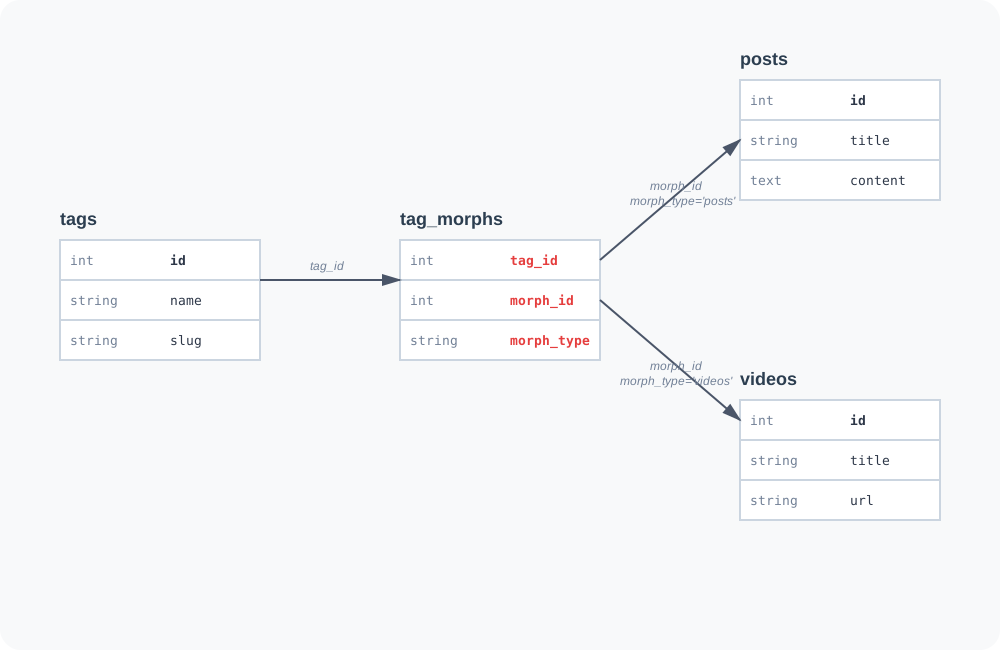
A polymorphic many-to-many relationship lets you share a single pivot table across multiple parent models. For example, both Posts and Videos can have Tags, but instead of creating separate post_tag and video_tag tables, you use one tag_morphs table that works for both.
Why use this?
When multiple models need the same many-to-many relationship (like tagging, categorization, or permissions), a polymorphic pivot table keeps your schema clean and your code DRY.
Schema Requirements:
The pivot table must have three columns:
morph_id- stores the parent model's ID (post ID or video ID)morph_type- stores the parent model's table name ('posts'or'videos')- Related model's foreign key (e.g.,
tag_id)
Example tag_morphs table:
CREATE TABLE tag_morphs (
    tag_id BIGINT UNSIGNED,
    morph_id BIGINT UNSIGNED,
    morph_type VARCHAR(255),
    PRIMARY KEY (tag_id, morph_id, morph_type)
);
Usage:
Use morphToMany() to define the relationship from the parent models (Post, Video) to the related model (Tag).
class Post extends Model
{
    public function tags()
    {
        return $this->morphToMany(Tag::class, 'tag_morphs', 'tag_id');
    }
}

class Video extends Model
{
    public function tags()
    {
        return $this->morphToMany(Tag::class, 'tag_morphs', 'tag_id');
    }
}
Usage:
$post = new Post(12);
$tags = $post->tags; // All tags for this post
Pivot Operations:
// Attach tags
$post->tags()->attach([1, 2, 3]);

// Detach tags
$post->tags()->detach([2]);

// Sync tags (removes old, adds new)
$post->tags()->sync([1, 3, 4]);
Morphed By Many
Use morphedByMany() to define the inverse polymorphic many-to-many relationship. For example, a Tag can belong to many Posts and many Videos.
class Tag extends Model
{
    public function posts()
    {
        return $this->morphedByMany(Post::class, 'tag_morphs', 'tag_id');
    }

    public function videos()
    {
        return $this->morphedByMany(Video::class, 'tag_morphs', 'tag_id');
    }
}
Usage:
$tag = new Tag(5);
$posts = $tag->posts;   // All posts with this tag
$videos = $tag->videos; // All videos with this tag
Counting Relations
withCount() works across all collection-style relationships—not just hasMany. This includes many-to-many (pivot), polymorphic many-to-many (morphToMany, morphedByMany), and through relationships.
Many-to-many (pivot):
// How many roles does each user have?
$users = User::query()->withCount('roles')->all();

foreach ($users as $user) {
    echo $user->roles_count;
}
Polymorphic many-to-many (morphToMany):
// How many tags does each post have?
$posts = Post::query()->withCount('tags')->all();

foreach ($posts as $post) {
    echo $post->tags_count;
}
Inverse polymorphic many-to-many (morphedByMany):
// How many posts and videos does each tag have?
$tags = Tag::query()
    ->withCount('posts')
    ->withCount('videos')
    ->all();

foreach ($tags as $tag) {
    echo $tag->posts_count;
    echo $tag->videos_count;
}
You can also combine withCount() with orderBy() on these relations:
// Users ordered by number of roles
$users = User::query()
    ->withCount('roles')
    ->orderBy('roles_count', 'desc')
    ->all();
For a complete reference on withCount(), withSum(), and all other aggregate facilities including defaults, callbacks, and deferred loading, see the Eager Loading documentation.
Querying Relationships
Understanding how to access and work with relationships is fundamental to getting the most out of your ORM. Lightpack ORM makes it intuitive to fetch related data, whether you want a single associated record or a whole collection of related models. This section will guide you through the mechanics, best practices, and the semantics of querying relationships. So let's reconsider the relation where an organization has many departments.
class Organization extends Model
{
    public function departments()
    {
        return $this->hasMany(Department::class, 'organization_id');
    }
}
Accessing Relationships: Property vs. Method
You can access a relationship in two ways:
-
As a dynamic property:
 $org = new Organization(1);
 $departments = $org->departments; // Property access
When you access a relationship as a property, the ORM automatically runs the underlying query and returns the related data. This is the most common and convenient way to fetch associated models.
-
As a method call:
$query = $org->departments(); // Method accessWhen you call the relationship as a method, you get the underlying query builder. This allows you to further customize the query before executing it:
 // Get all active departments
 $activeDepartments = $org->departments()->where('status', 'active')->all();

 // Get the first department
 $firstDept = $org->departments()->one();

 // Find a specific department by ID
 $dept = $org->departments()->find(5);
What Happens Behind the Scenes?
-
Property Access:
- The first time you access a relationship as a property (e.g.,
$org->departments), the ORM calls your relationship method, executes the query, and caches the result on the model instance. Subsequent accesses return the cached result. - If the relationship returns multiple models (like
hasMany), you receive a Collection of models. - If the relationship returns a single model (like
hasOneorbelongsTo), you get a single model instance ornull.
- The first time you access a relationship as a property (e.g.,
-
Method Access:
- Calling the relationship as a method (e.g.,
$org->departments()) returns the query builder object. You can chain additional constraints, then call query methods likeall(),one(),find(),count(), etc., to execute the query and fetch results. - This is ideal when you want to apply dynamic scopes or advanced queries on the relationship.
- Calling the relationship as a method (e.g.,
Finding Specific Related Records
When you need to find a specific related record by its primary key, use the find() method on the relationship. This ensures that the record not only exists but also belongs to the parent model.
$org = new Organization(1);

// Find department with ID 5 that belongs to this organization
$dept = $org->departments()->find(5);
Exception Handling:
By default, find() throws a RecordNotFoundException if the record is not found. This is consistent with the behavior of Model::find().
try {
    $dept = $org->departments()->find(999);
} catch (RecordNotFoundException $e) {
    // Handle not found
}
Returning Null Instead:
If you prefer to receive null instead of an exception when a record is not found, pass false as the second parameter:
$dept = $org->departments()->find(5, false);

if (!$dept) {
    // Department not found or doesn't belong to this organization
}
Security Benefit:
Using find() on relationships ensures that the record belongs to the parent model. For example:
// This will only find department 5 if it belongs to organization 1
$dept = $org->departments()->find(5);

// If department 5 belongs to a different organization, it returns null (or throws exception)
This prevents unauthorized access to records that don't belong to the parent model, making your application more secure.
Chaining with Other Constraints:
You can combine find() with other query constraints:
// Find an active department with ID 5
$dept = $org->departments()
    ->where('status', 'active')
    ->find(5);
Collections: Working with Multiple Related Models
When a relationship returns multiple models (such as with hasMany, belongsToMany, or morphMany), the result is a Collection object. This collection behaves much like an array, but is enhanced with a rich set of methods for filtering, mapping, reducing, and more. For example:
$departments = $org->departments; // Collection of Department models

// Get the names of all departments
$names = $departments->column('name');

// Filter only active departments
$active = $departments->filter(function($dept) {
    return $dept->status === 'active';
});
Collections make it easy to work with groups of related models in a fluent, expressive way. You’ll find a full guide to collections in a dedicated section of this documentation.
Best Practices and Semantics
- Use property access for simple, direct retrieval of related data.
- Use method access when you need to customize the query.
- Use
find()on relationships when you need to ensure a record belongs to the parent model. - Remember caching: Property access caches the result for the current model instance.
- Understand return types: Relationships that return many models give you a Collection; those that return one give you a model instance or
null. - Be intention-revealing: Name your relationship methods for clarity and business meaning.
By understanding the difference between property and method access, and how collections work, you’ll write more expressive, efficient, and maintainable code with Lightpack ORM. For a deep dive into collections and their powerful capabilities, see the Collections documentation.
Semantic Relationship Methods
Semantic relationship methods empower you to define model relationships that are not only technically correct, but also meaningful and intention-revealing. Instead of limiting your models to generic accessors like departments(), you can define expressive methods such as activeDepartments(), hrDepartments(), or recentlyCreatedDepartments(). This approach makes your codebase more readable, maintainable, and aligned with real business logic.
Why Semantic Methods?
- Clarity: Your model methods communicate why you’re fetching certain related data, not just how.
- Maintainability: Changes to business logic (e.g., what counts as “active”) are isolated to a single place.
- Expressiveness: Your code reads like natural language, making it easier for new developers to understand intent.
Example: Organization and Departments
Suppose you have an Organization model and a related Department model. Each organization can have many departments, but you want to easily fetch only the active ones, or only those in the HR domain.
Standard Relationship
class Organization extends Model
{
    // All departments for this organization
    public function departments()
    {
        return $this->hasMany(Department::class, 'organization_id');
    }
}
Semantic (Filtered) Relationships
class Organization extends Model
{
    // Only active departments
    public function activeDepartments()
    {
        return $this->hasMany(Department::class, 'organization_id')->where('status', 'active');
    }

    // Only HR departments
    public function hrDepartments()
    {
        return $this->hasMany(Department::class, 'organization_id')->where('type', 'hr');
    }

    // Departments created in the last 30 days
    public function recentlyCreatedDepartments()
    {
        return $this->hasMany(Department::class, 'organization_id')
                    ->where('created_at', '>=', now()->subDays(30));
    }
}
Usage
$org = new Organization(1);

// Get all departments
$departments = $org->departments;

// Get only active departments
$active = $org->activeDepartments;

// Get only HR departments
$hr = $org->hrDepartments;

// Get recently created departments
$recent = $org->recentlyCreatedDepartments;
Best Practices
- Name methods for intent: Use clear, business-driven names like
activeDepartments()orfinanceDepartments(). - Centralize logic: Place filtering logic in the relationship method, not scattered throughout your codebase.
- Document your methods: Briefly describe what each semantic relationship returns.
When to Use Semantic Relationships
- When you have common queries that filter or scope related data.
- When business logic or access rules change over time.
- When you want your code to be self-documenting and intention-revealing.
Semantic relationship methods are a powerful way to make your models expressive, maintainable, and aligned with your domain. By naming relationships for what they mean, not just what they are, you create a codebase that’s easier to read, reason about, and extend.
How does this work behind the scenes?
Each relationship method returns a query builder. This means you can chain and apply any filtering, sorting, or limiting logic directly within your relationship method. When you access a property like $organization->activeDepartments, the ORM executes the query as defined in your method—including all your custom conditions—and returns the result. This is why you can define as many semantic, filtered relationships as your application needs.